Coachtor is in testing with its first coaches, through Apple's TestFlight. It is not in the App Store yet. Each card says where a feature stands today.
Live on the webiPhone, in testing
Owners: "Are we OK this week?"
The owner's Today opens on one card: a one-line answer, then who to call first, any late payment, and a coach who needs a hand, each with one button. A manager sees the same card with no payment row. If late payments did not load, the card says so instead of saying all is well.
Live on the web
A Clients table at a desk.
On a wide screen, a coach can switch Clients from a list to a table: status, this week, streak, last workout and one next step per client, with columns you can sort. The phone keeps the list. More, Getting started and Away also use the full page width at a desk.
Live on the webiPhone, in testing
A grayed-out button says why.
When a main button cannot be tapped yet, a short line under it says what is missing: "Write the message first." or "Add their name first." This covers Message all, Start a challenge, Start a team, Invite a coach, both import pages and My offers. Library tabs now wrap onto a second line instead of scrolling sideways.
Live on the webiPhone, in testing
A client's workout recap is written for the client.
A client reading their own finished workout no longer sees the coach's cards. The recap speaks to them: "Your reason", "Your usual", "Waiting on your coach". The coach's view is unchanged. In the look-around, the coach's Money page now shows a made-up book.
Live on the web
Coach Today in two columns at a desk.
On a wide screen, Today shows your schedule with a Needs you list beside it, so the clients who need a reply, a plan or a check-in sit next to the day. If a list behind it fails to load, it says so instead of saying nobody needs you.
Live on the webiPhone, in testing
Needs you comes first on a client.
A client's record and the Clients side panel open with Needs you on top, above the last four weeks. The Clients list is wider at a desk. Row buttons are quieter, done days get a check mark, and red is kept for real problems.
Live on the web
Owner pages: sort, export, and who to call first.
Owners can sort the Coaches page and export the Coaches and Clients lists. When more than three clients have gone quiet, Clients shows a Call these 3 first card. Gym and coach pages have plainer headings, coaches show three to a row on a big screen, and the revenue bars say how much changed from the month before.
Live on the webiPhone, in testing
The look-around is filled in and adds up.
The sample coach and client in the look-around now have made-up data on every page, from Getting started to Payments, and every count comes from one list, so the numbers agree from screen to screen. When a coach changes, the note about it shows in the conversation again.
Live on the web
The side menu stays put at a desk.
Every coach and owner page at a desk keeps the side menu, including on a fresh load. The page sits beside the menu with one gutter instead of a narrow strip in the middle of a wide screen, and the calendars use the full width.
Live on the web
Inbox at a desk opens your newest unread chat.
Open the Inbox at a desk and the newest unread conversation shows by itself. It stays marked unread until you click or type in it, or pick its row. A chat, reply or nudge opened from anywhere at a desk now lands in the Inbox pane with the side menu kept. Hover tools are a small two-icon pill by the bubble, and nothing is outlined until you use the arrow keys.
Live on the web
More lists only what the side menu does not.
At a desk, More no longer repeats the side menu. On a phone, More is unchanged. The side menu lights one item at a time.
Live on the webiPhone, in testing
Plainer coach words.
Today says "2 sessions left in pack" with a "1 more" link to the week. A coach who is not the owner sees Ask your owner instead of an invite form that gets refused. Workout not found offers Go to Today and Open clients. Check-in counts read in the normal text color; red is for pain or a missed workout only. Each win to cheer has one Send cheer button. The owner's coach page says No phone number on file.
Live on the webiPhone, in testing
Client screens: Finish, bigger helper text, clearer buttons.
The end-of-workout button is Finish, because the sets are already saved; it keeps your note and effort. Helper text on client screens is bigger and a lighter gray. Today's three links are full-size buttons, and "Something else" is now "My own workout". The Food page explains that your coach turns food on, and Delete all my food data moved under Me. Empty pages say why and give one button back. The look setting is called Light or dark. A client never sees coach words or the coach menu on a workout recap or Next week.
Live on the webiPhone, in testing
Put a follow-up off, your way.
Tap Later on a follow-up and it opens the choices: Dismiss, or Remind me later. Remind me later offers 3 hours, 6 PM, tomorrow at 8 AM, 3 days or next Monday, and the follow-up comes back then. Dismiss was called Not needed.
Live on the webiPhone, in testing
A quiet client you messaged counts as handled.
When you send a Nudge to a client who has gone quiet, Coachtor now treats it as handled. It comes back in 3 days if they are still quiet, and Undo is on Today.
Live on the webiPhone, in testing
Send stays above the keyboard.
When you edit a message that is lined up to send, the Send button sits just above the keyboard, so one tap sends it.
Live on the webiPhone, in testing
Cleaner Inbox rows, and Profile in the chat.
Inbox rows no longer say "With" and a name when nothing is waiting on you. The Record link at the top of a client's chat now says Profile, because it opens their profile, not a recording.
Live on the webiPhone, in testing
Tapped Finish by mistake? Continue workout.
The finish screen and Today now have a Continue workout button. It opens the same workout with your sets and notes, and you can log the next set. The time you were away does not count as training time.
Live on the webiPhone, in testing
Set a start time and an end time.
To fix a workout's length, pick when it started and when it ended. Coachtor works out the minutes. The five-minute stepper is gone.
Live on the webiPhone, in testing
A shorter lift menu that scrolls.
The More menu on a lift keeps eight everyday choices, each with one short line. The rest are under More options. The menu scrolls inside its card, so nothing is cut off.
Live on the webiPhone, in testing
Timed holds read in seconds.
A plank or a hold shows seconds in last time, history, the recap, the set sheet and the swap pop-up, not reps.
Live on the webiPhone, in testing
Consult recaps fold into one card.
A consult recap is one card with plain headings. Older recaps fold away too, so the page is shorter.
Live on the webiPhone, in testing
Plain words when something fails.
When a save or a send does not go through, Coachtor now says so in a short sentence you can act on, like "The message did not send. Try again." It no longer shows the database's own text. If you have no signal, it says that instead.
Live on the webiPhone, in testing
Buttons answer your tap.
A button now dims while your finger is on it, and on the phone it gives a light tap you can feel, so you know the press landed.
iPhone, in testing
The keyboard stays clear of what you type.
On the longer forms, like the note after a workout, the page now scrolls up as the keyboard opens, so the box you are typing in stays in view.
Live on the webiPhone, in testing
A money Save cannot save twice.
On the coach's package and price form and on the payments match form, Save now waits for the first tap to finish. A quick double tap no longer saves the same thing twice.
Live on the webiPhone, in testing
Messages that read like a text thread.
A thread now looks like iMessage: bubbles with tails, a time only after a 15-minute gap, swipe left to see every exact time, and one Read under the last message. The Inbox shows one row per client with their last message, the time and a clear unread mark. A long consult recap opens folded to 3 lines, and your own notes look different from the app's cards.
Live on the webiPhone, in testing
Sent consults stay sent.
Once a consult's plan is sent, it can't be turned back into a draft, and the server now refuses it too, before any AI runs. A client with past consults is no longer offered a "first consult", and the consult card is tidier.
Live on the webiPhone, in testing
Small fixes from phone checks.
The record's last 4 weeks rows read "Oct 12" instead of a bare 12. On a client's month calendar, done days get a check mark, and a plan done in order shows "Next in order" instead of Missed. MyZone and a chest strap are now on the heart-rate device list. Long lift names wrap to 2 lines at most.
Live on the webiPhone, in testing
One Follow-ups list.
Check-ins, reminders and lined-up messages now live in one list on Today, opened from All follow-ups, with chips to filter by reason. Every chip adds up to the same count. Remind several clients at once, each as their own message. The client list's Tools button is gone: Select picks clients, Import sits under Add, and your gym is under More.
Live on the webiPhone, in testing
Bring your clients over.
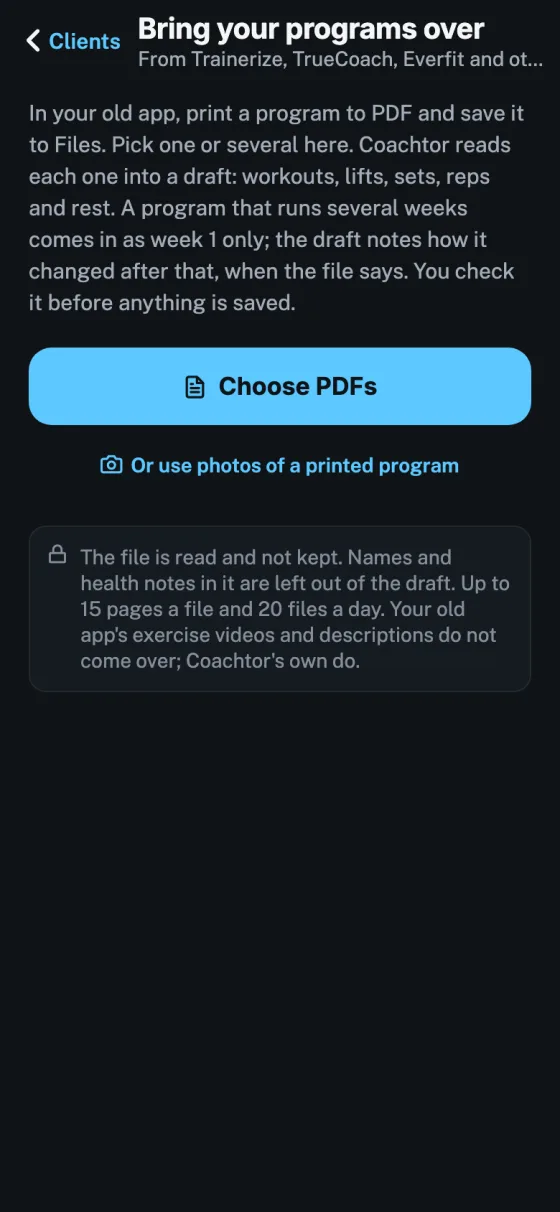
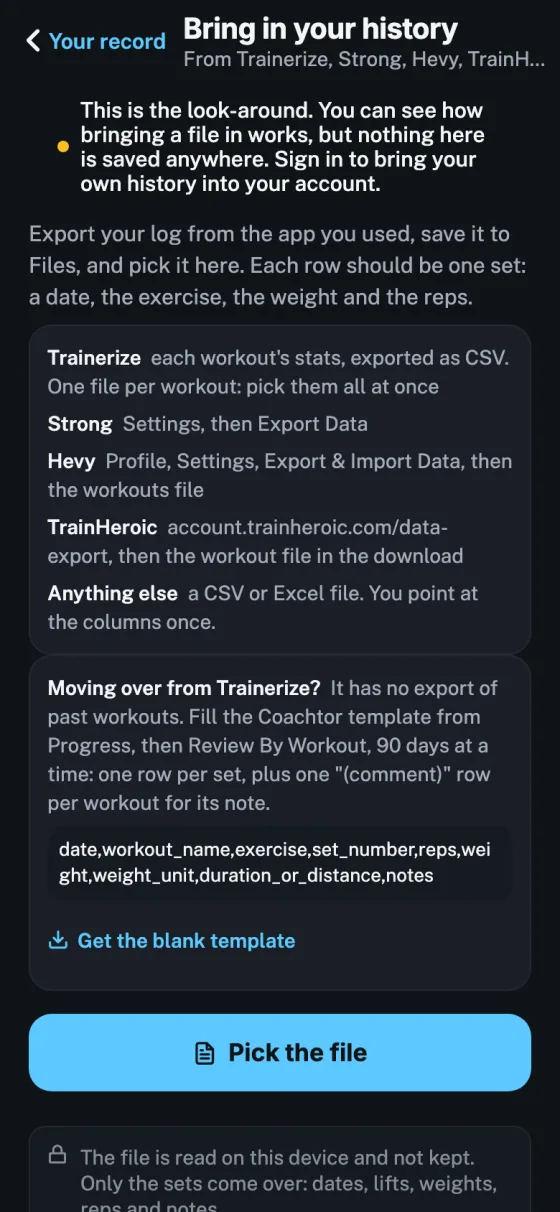
Import a client's workout history from Trainerize or TrainHeroic yourself. Each invite shows whether it is ready: workouts, consult and weigh-ins in. An odd weight in a file, like 16 among 160s, is kept and flagged for you to check, never dropped.
Live on the webiPhone, in testing
Check-ins easier to read, and replies drafted.
On a phone, a check-in's questions now show in full and long answers get their own row. In an early test with one coach, Coachtor drafts a reply to each check-in, and a change to next week's program, only for clients who said yes to AI help, up to 150 a day. You read and change the reply before it sends, and the program changes only when you tap Approve.
Live on the webiPhone, in testing
Training a client, made clearer.
When you train someone, each lift shows what they did last time and what to do today. The row under a set now says Coach notes, and rating a set offers cues that match the lift, plus an optional typed note. A one-side lift can be counted each side for today, and the heart-rate chip has an X to hide it.
Live on the webiPhone, in testing
Clients say yes to AI help themselves.
A client whose coach turned on AI help is asked once, on their Today screen, whether that is OK. Yes keeps it on. Not now turns it off, and that beats the coach's switch. The privacy page says the same.
Live on the webiPhone, in testing
Late messages say they are late.
A lined-up message past its day now reads "3 days late" instead of a weekday. Each client keeps one weekly check-in reminder at a time, so last week's unsent one closes when the new one lines up. Nothing sends without your tap, same as before.
Live on the webiPhone, in testing
A client's last 4 weeks, at a glance.
The top of every client record shows the last 4 weeks as colored squares: done, missed, moved, check-in, 1-on-1. Tap a day to see what they logged, or what happened to a missed workout.
Live on the webiPhone, in testing
Calendar in the coach's bottom bar.
Coaches get a Calendar tab between Clients and Inbox: this week, how many workouts are done so far today, and who missed yesterday. At a desk it sits in the side rail.
Live on the webiPhone, in testing
Calendar for clients too.
Clients get a Calendar tab: the month in colored squares, how many workouts they have done this month, and what is coming up. Tap a past day to see what they logged.
Live on the webPhones, in testing
A calendar for every client's plan.
Each client plan opens as a week or a month, on the phone and the desk. A coach picks how the plan lays out: in order, where a missed day slides forward, or on set dates, where a missed day stays missed until it is moved.
Live on the webPhones, in testing
Tap a date to add or move.
Tap any date to add a workout, a one-time workout, a 1-on-1, a weigh-in, a body scan, measurements, a reminder or a note. Move a workout by tap or by press-and-drag, skip a day, repeat an item, undo a move.
Live on the webPhones, in testing
Clients see who set what.
A client sees "Set by" their coach on Today, can move any workout ahead, and the coach sees "Moved by" the client. Nothing buzzes except a timed reminder, which checks every five minutes. A coach-only note stays with the coach.
Live on the webPhones, in testing
A typed consult that thinks ahead.
Every question offers answers to tap, an example, and a note box. What you answer changes what comes next, so a plan needs no second round of questions. The health form is inside the consult, filled once.
Live on the webPhones, in testing
Your answers, your call on AI.
At Finish you choose: an AI draft for your coach to check, or coach only. Coach only means nothing from that consult reaches the AI, and a coach cannot undo that choice. The consult works with AI off too.
Live on the webPhones, in testing
Sore spots become notes to confirm.
Tap where it hurts and the coach gets a proposed injury note to confirm, never one saved behind their back. A long typed note or a talk fills later answers, and you keep only what is right.
Live on the webPhones, in testing
Every cardio round shows.
An air bike planned as 30 seconds, six times, now shows six rows in the workout, not one. Each row's time sits in Minutes as 0:30. It works the same on the rower, bike, treadmill and stair climber.
Live on the webPhones, in testing
Plain labels, right numbers.
The calories column says Calories, and a planned time never lands in it. The + and - keys move a time like 0:30 by a minute and stop at 0:05.
Live on the webPhones, in testing
Short times in the plan editor.
On the phone plan editor, a 30 second cardio round reads "30 sec", not 0.5 min. Change it there and the client's workout link shows the new time.
Live on the webPhones, in testing
A calm coach Today.
Up to five cards for today, one per client, biggest first. Each says what is wrong in plain words and has the one button that fixes it, like Reply or Review plan. Later puts a card off until tomorrow, with Undo.
Live on the webPhones, in testing
Everything else, in one place.
One "Also this week" row opens a pop-up: who has gone quiet, check-ins not in, consults to write up, plans to look at and packages running out, each with its own button. The check-ins page now opens on this week.
Live on the webPhones, in testing
One number you can trust.
The Today tab, the header and the app icon all show the same number: the cards for today. Inbox shows a dot. Also fixed: a consult sent from the plan page shows as sent, with no Send left on it.
Live on the webPhones, in testing
Your week at a glance.
A week strip on top of coach Today: how many workouts are done, a ring per day, and amber for a missed one. Tap a day to see who trained, what they lifted and how hard. A workout done a day late or early is not called missed.
Live on the webPhones, in testing
Lift changes you can find.
When a client swaps a lift, Today says "See the changes" and opens them in one pop-up: what was planned, what they did, and why. The client's record says how many are waiting, near the top.
Live on the webPhones, in testing
One clear way to start the consult.
A client who chose "later" now sees one consult card with three ways in: type it in the app, talk it through by voice, or do it in person with their coach. Also fixed: on iPhone, sound goes back to the speaker after a voice recording.
Live on the webPhones, in testing
Client photos everywhere.
A client's photo now shows wherever their initials circle was: Today, the desk, Lately, Check-ins, recaps, Inbox, Clients, Add to workout and the consult lists. The coach's own face shows in the corner and on the client's Your coach card. Initials stay when there is no photo.
Live on the webPhones, in testing
Cardio details on the plan.
A cardio row shows its machine settings, like "Incline 6%, level 8", in the coach's plan editor on phone and desk, the client's workout overview, the workout itself and History. The desk editor no longer shows a treadmill as "1 set, 0 reps".
Live on the webPhones, in testing
A tidier Today.
The "N for today" count leaves out clients whose only items are in Older. The birthday and consult-due Clear pop-ups close when you leave Today. Today reads a client's newest group plan, the same as their record.
Live on the webPhones, in testing
Today keeps working after Review on iPhone.
On an iPhone, Today could stop taking taps after a coach opened a client's pop-up or went to Review. Now every button keeps working, and the next screen opens only once the pop-up has closed.
Live on the webPhones, in testing
"Ran short" compares to the plan.
A workout is called short only against the minutes the plan asked for. A client's recent average is used only when the plan names no length, and only with 2 or more workouts behind it. The drafted message says the same.
Live on the webPhones, in testing
Discard a draft, with Undo.
A workout recap's draft now has Discard next to Send. It comes off Today, nothing is sent and nothing is deleted, and Undo brings it back.
Live on the webPhones, in testing
Fewer false alarms, more cards you can clear.
A client whose only plan is a draft not yet sent is never called "Gone quiet" and gets no quiet buzz. The birthday and consult-due cards now have Clear, and drafts older than 14 days fold into Older.
Live on the webPhones, in testing
Cardio rows in a planned workout.
A cardio lift logs rows like lifting, each with its own time plus the machine's second number: distance, floors on a stair climber, calories on an air bike, laps in a swim, or level on an elliptical. Pace and speed are worked out for you, and cardio bests (farthest, longest, fastest pace) never mix with lifting bests.
Live on the webPhones, in testing
Change what a lift tracks.
From a lift's menu, pick Weight and reps, Time, or Cardio. A coach can use it for today, or say Yes to "Fix it for next time too?" to change the client's plan and their own library together (the library change applies to new plans only).
Live on the webPhones, in testing
Cardio targets in the plan editor.
A coach can set minutes and distance on each cardio row of a plan, and the workout reads it plainly, like "1 × 20 min · 2 mi". When a client changes what a lift tracks, the coach sees one quiet line with Undo, never a buzz.
Live on the webPhones, in testing
Strength by movement.
The coach sees one line each for squat, hinge, push, pull, lunge and carry over the plan block, on the client's Progress and at each check-in. The client sees the same in plain words. Under 3 weeks it says "early days" instead of a number.
Live on the webPhones, in testing
A plan in 3 steps.
Drafting from a plan style is now Style, Days and time, then Check and draft. More options sits in 3 groups, and once a phase is running a small map shows where the client is in the whole plan.
Live on the webPhones, in testing
Imported assisted lifts read the right way.
Trainerize saved an assisted pull-up or dip as the weight lifted; Coachtor saves the help the machine gives. Imported Trainerize sets on those lifts now read "lifted (from Trainerize)" and are kept out of bests, charts, last time and starting weights, so they never look like a client got weaker or stronger.
Live on the webPhones, in testing
"Are you done?" after 20 quiet minutes.
When a workout sits 20 minutes with no set logged, the client gets one nudge: Finish and save, or Keep going. It replaces the old 60-minute buzz. Rest now names the next round in a circuit, holds take a weight and read "each side", and bests are counted the same everywhere.
Live on the webPhones, in testing
Review plan, then send.
A draft the coach has not looked at says Review plan, opens with its changes marked and puts Send at the bottom. Day chips on the client record switch the workout, Add lifts opens full height, and Lifts to tag adds imported lifts that used to fail.
Live on the webPhones, in testing
Safer plans and truer counts.
An old copy of a plan on a second device can no longer overwrite a newer one already sent. Gone quiet ignores imported history, the owner's client list stops showing zeros, and a one-time workout no longer counts as part of the week.
Live on the webPhones, in testing
Plans for clients who have not joined yet.
When a coach brings in a client's past training before they join, the plan builder now uses it for lift choices, starting weights and Last time, and reads the consult saved on the invite. Start over and copy work for an invited client on the phone too.
Live on the webPhones, in testing
Stop signs during a challenge.
While a challenge phase runs, the client sees the signs to stop for and a 911 line. "I hit a stop sign" ends the challenge, puts the base plan back that day and tells the coach. A yes to a check-in question the coach flags also shows the coach a red flag.
Live on the webPhones, in testing
Email the invite.
A coach taps Email and the client gets a branded invite from the coach and gym, with the three steps to get in and the date it runs out. Replies go to the coach. The list says when it was emailed, Email again resends, and Share or Copy still works.
Live on the webPhones, in testing
Phased plans with a checkpoint.
A phase can stay locked until the coach records a professional's clearance, and an optional phase lets the client join or skip. Coaches write what the client reads for each phase and week, and keep private notes only they see. Habits can step up their daily number without breaking the streak.
Live on the webPhones, in testing
A calmer coach desk.
Today leads with today. Cmd K jumps to any client, J and K move down the list, and several drafts send at once. A coach is told when a client's weekly weigh-ins stay flat for 3 weeks. Supersets on the desk now take 3 lifts or more.
Live on the webPhones, in testing
Invites stay open 60 days.
New invites and Send again last 60 days, not 14. The Invited tab shows how many are sent and how many are not yet. Calorie targets under 1,200 a day need the name of the professional who set them.
Live on the webPhones, in testing
A sent plan shows up right away.
When the coach sends a plan, the client's app reads it again as soon as they open it, tap the notice or pull down. No more yesterday's plan after a Send.
Live on the webPhones, in testing
Fewer questions after a set.
"Why did it stop?" only comes up on a clear miss. "How hard?" asks once per lift, after its last set, with Skip. Tapping a number box replaces the number instead of adding to it.
Live on the webPhones, in testing
A new finish screen.
"How did it feel?" comes first, your top three bests show with See all, Done stays in reach, and you can add a progress photo.
Live on the webPhones, in testing
Your coach's message, mid-workout.
A new message from the coach shows as a small pill under the header. Tap to read it without leaving the workout.
Live on the webPhones, in testing
Smoother sets and supersets.
Change a weight once and apply it to the sets still to do in one tap. Timed holds get a 10 second get-ready with Skip. Ungroup or remove a superset in one tap, in the plan or mid-workout. The rest bar shows the next lift on its own line.
Live on the webPhones, in testing
Clearer weights.
A barbell weight is the whole bar; dumbbells and kettlebells say "each". Kettlebells in pounds step between real bell sizes, 18 to 106. A lift with no weight logged says so, instead of calling it bodyweight.
Live on the webPhones, in testing
Fresher cheers for the coach.
The cheer options come from three real things the client did, worded differently each time and never a repeat of the last few. The coach still picks and sends.
Live on the webPhones, in testing
Consult to plan is simpler.
One safety card you tick off once. What the client asked for goes straight into the unsent draft. The plan has one status word everywhere, and Needs you shows one row per job. Pick where the plan starts from: an AI draft, My programs, a copy of another client's plan, or build it yourself. Then one Send.
Live on the webPhones, in testing
Old Strong exports keep their weights.
Older Strong files used to come in with every weight missing. Now they bring their weights and their timed sets.
Live on the webPhones, in testing
Weights land on real gym sizes.
Kettlebells step up by real bell sizes, and suggested weights land on weights a gym can actually load. A saved weight that isn't a usual size gets a small note and is never changed.
Phones, in testing
A shorter swap menu on Android.
Swapping a lift on Android shows the first 40 choices and scrolls cleanly. Search finds the rest.
Live on the web
The desk Inbox fits at bigger text.
With a larger text size turned on, the Inbox on the desk now fits the screen.
Live on the webPhones, in testing
"New to Coachtor?" opens as a pop-up.
On the sign-in screen, "New to Coachtor?" now opens a centered pop-up with the three ways in, for a coach, a gym or a client, and Close takes you back to sign-in.
Live on the webPhones, in testing
The AI plan builder stops repeating lifts.
A drafted workout never uses the same lift twice, or two names for the same lift, and a push day runs in rounds of chest, shoulders, then arms or abs, with a different variation each round.
Live on the webPhones, in testing
Imported lifts use library names.
A lift brought in from another app now shows its library name on Today's Strength tile and on the coach's charts. A library plank reads in seconds on the plan, in the workout and on Done.
Live on the webPhones, in testing
Bests are counted by lift.
The workout header, Today and the finish screen now count lifts with a new best, so one lift that beat three bests reads 1 new best. A lift's total for the day shows under the lift on the finish screen, not on one set. The finish screen also counts a whole workout that beat its last volume as one more.
Live on the webPhones, in testing
A consult draft keeps library lifts.
A plan drafted from a consult now names real lifts from the exercise library, including a lift the coach swaps in or adds. The client's history and the body map follow those lifts.
Live on the webPhones, in testing
A hold can carry a weight.
A plank or other hold can now log seconds and a weight on the same set, with + Weight. A side plank logs its seconds for each side, like 20 sec each side.
Live on the webPhones, in testing
One-arm lifts read each side.
A one-arm lift like a dumbbell row now reads its weight as one side's, like 45 lb each side x 10, in the workout, on Done and in its history.
Live on the webPhones, in testing
A one-time workout.
On a client's Plan tab, a coach can now add a one-time workout on a day they pick. The client sees it on that day only, and their plan and what comes next stay the same.
Live on the webPhones, in testing
Talk to change it knows today.
Talk to change it now reads today as the client's next workout, can build supersets, like only 3 supersets today, and matches the lift names the coach says to the exercise library.
Live on the webPhones, in testing
Something else today, as a workout.
When a client picks Something else today and adds a lift, the button now reads Start workout and opens the logger with no set ticked. It counts as done only when the client finishes it, instead of saving every set as done. Cardio on its own still logs right away.
Live on the webPhones, in testing
The body map lights every muscle.
The Today so far body map now lights every muscle a workout worked. Back, lats and quads could stay dark when a lift was saved under a different id.
Live on the webPhones, in testing
A best badge means a best.
In a workout, a best badge now shows only on a set that beat a best, and the header counts each best once.
Live on the webPhones, in testing
Pick how the plan runs, then Send.
On a follow-up consult at the desk, the bar with Send now says once, beside it, to pick how the plan runs: in order, or on set days. Tapping Send before that takes the coach to the choice instead of sending.
Live on the webPhones, in testing
An off Send looks off.
In a message thread, Send while there is nothing to send is now gray with muted text, easy to read, instead of a faded blue that looked broken. Screen readers say it is off too.
Live on the webPhones, in testing
Plan sent this week.
On the owner's client list, a client whose plan went out this week now reads plan sent this week, instead of plan 0 weeks old.
Live on the webPhones, in testing
One card for several swaps.
When a client swaps several lifts, the coach's Inbox shows one card, like Swapped 4 lifts, instead of one card per swap. Review all lists each one.
Live on the webPhones, in testing
Bigger day buttons.
The day buttons on a plan are now 44 by 44, on the phone plan editor and the desk plan page, so each day is easy to tap. On a narrow phone the seven days wrap to two lines.
Live on the webPhones, in testing
A library plank logs in seconds.
A plank picked from the exercise library now logs in seconds in the workout, with a timer on each set, even when the coach did not set Seconds on the plan.
Live on the webPhones, in testing
The weight picker matches Done.
In the body weight picker, a tap on plus or minus now moves the band to the new number, so the number in the band is the one Done saves.
Live on the webPhones, in testing
Closed to signed-out visitors.
Someone who is not signed in can no longer run 9 of Coachtor's internal database functions. This came from a security review. Nothing changes for anyone signed in.
Live on the webPhones, in testing
One rest timer.
The workout screen now has one rest timer: the amber band at the top, which stays in view while the client scrolls. The second timer inside the lift card is gone.
Live on the webPhones, in testing
The next set follows the client.
After a client logs a set, Next up moves to that same lift's next set, on the card and on the bar at the bottom, instead of jumping back to the first lift in the plan.
Live on the webPhones, in testing
Superset rounds read right.
In a superset, the round chip shows the round the client is on, so it reads Round 4 of 4 after every set of the first lift. When the client goes ahead of the round, doing all of one lift first, rest still starts. Going back and forth works as before.
Live on the webPhones, in testing
Booked, with Undo.
When a coach picks a time under When's next?, it shows Booked with an Undo button for 5 seconds, then books it and tells the client. Tap Undo in time and nothing is booked or sent. Leaving the screen books it right away.
Phones, in testing
The notifications card lines up.
The Turn on notifications card on the finish screen now lines up with the Done button.
Live on the webPhones, in testing
New to Coachtor? on sign-in.
The phone and desk sign-in now have one New to Coachtor? link. It opens a small page with three paths: a client asks their coach for an invite, a coach sees how Coachtor works and saves a spot, and a gym books a call. Coachtor stays invite-only.
Live on the webPhones, in testing
Superset reps stay as planned.
When a lift in a superset is planned as 8 to 9 reps, Edit all now shows that range, and saving keeps each set's own reps instead of changing them all to one number.
Phones, in testing
No notification question mid-workout.
The workout screen no longer stops to ask about notifications. After the client's first finished workout, the finish screen shows one Turn on notifications card, once per phone. Until they turn them on, the rest timer only rings while the app is open.
Live on the webPhones, in testing
Sign-in tries once more.
If the sign-in server's clock is a moment off, sign-in now waits about a second and a half and tries again by itself, instead of showing an error.
Live on the webPhones, in testing
Android invites use the testing link.
An invite to a client on Android now carries the link to Coachtor's closed test on Google Play, so they land on the version in testing.
Live on the webPhones, in testing
The right split squat video.
Dumbbell Single Leg Split Squat now plays a video with both feet on the floor, and its How steps match: a long split stance, no bench.
Live on the webPhones, in testing
Check-ins every two weeks, per client.
A switch on the client's record sets Every week or Every 2 weeks. The off week has no reminder and no chase, and the app never calls it missed. If the client moves to another coach, the rhythm moves with them.
Live on the webPhones, in testing
A progress review at each phase end.
At the end of a phase, or at most every 6 weeks, a short review is drafted from the client's workouts, check-ins and goal. The coach changes any line and taps Approve. Only then does the client see it, and if the coach edits it later, it says so.
Live on the webPhones, in testing
Lighter weeks, suggested.
When a client misses reps two workouts running, rates workouts hard, skips sessions or has a rough check-in, the coach sees a suggested easier week: about 60% weight, same lifts. Nothing changes until the coach approves, and then the client sees an Easier week card.
Live on the webPhones, in testing
A rep ladder, and Do more.
A lift can climb one rep a set each time every set is hit, up to 20 by default, with each side counted per side. Clients can tap Do more. After two workouts done exactly as written, the app asks once whether they did it as written.
Live on the webPhones, in testing
Streaks worth seeing.
Clients get a gold "weeks in a row" badge when they finish a workout. Coaches see the same streak on Clients and the record, and a quiet note for a week when a long run ends. It is never red, and only the coach sees it.
Live on the webPhones, in testing
A cleaner lift library.
27 demo videos now show the right move, 25 tags are corrected, and dozens of lift names are clearer. A renamed lift keeps its history, and imports with the old name still find it.
Live on the webPhones, in testing
A consult opens the plan page.
From a consult's plan step, Edit and send in the plan page opens the full plan page with the consult's draft and a Back to the consult link. If you have unsent changes there, it asks before replacing them.
Live on the webPhones, in testing
Today, faster again.
The coach's Today now reads one best per lift instead of every set ever logged. On our test gym it opens in about 2 seconds, down from 3.5 two days ago.
Live on the webPhones, in testing
Swap a lift in one tap.
On the desk plan page, a lift's menu offers three lifts of the same movement, one tap each. The swap list opens on the same movement first, above every lift. Long lift names and the "Last time" line now wrap instead of being cut off.
Live on the webPhones, in testing
Plan drafts with more variety.
A six-day mixed week is Push, Pull, Legs, twice. Repeat days use different lifts, the client's own first. Every week covers all six movement patterns, and each push day gets an overhead press and each pull day a vertical pull, unless an injury rules it out.
Live on the webPhones, in testing
A tidier Inbox at the desk.
Messages lined up for one client show as one chip with Review all, and the Inbox gives them one row instead of a row each. The waiting items fit on one line, and the coach's thread uses the full desk width.
Live on the webPhones, in testing
Today opens sooner.
The coach's Today loads its parts together and shows before the wins fill in. On our test gym it opens about a second sooner.
Live on the webPhones, in testing
Clear words when the AI is off.
If a client hasn't turned on Coachtor's AI, the plan page says so plainly, with a ready message asking them to turn it on (you send it, never the app) and Edit by hand. The rule itself is unchanged.
Live on the webPhones, in testing
Send on a consult never looks stuck.
If a follow-up consult needs you to pick how the plan runs, the reason now shows right beside Send. A follow-up starts on the plan's current mode, so most of the time there is nothing to pick.
Live on the webPhones, in testing
Draft or live, at a glance.
Every plan screen says at the top whether you're working in a draft the client can't see yet, or looking at the plan they have. "Adjust this plan" is the first choice, so changing a plan never means starting over.
Live on the webPhones, in testing
Extras can be real workouts.
An optional extra can be a walk or a full workout with lifts. The client logs it set by set, it counts toward their week once, and skipping it is never a miss.
Live on the webPhones, in testing
Clients can ask to add a move.
Found a move they like? A client asks to add it to their plan, even one the app doesn't have yet, with a name or a link. Only their coach sees it, picks the day and approves.
Live on the webPhones, in testing
What you asked the AI, kept.
Each plan keeps a short history of what the coach asked the AI and what was used. Only that coach sees it. Think with me now has Back to the options.
Live on the webPhones, in testing
Small fixes that add up.
Try again after a crash restarts the app instead of a black screen. A half-finished workout no longer reads as done. Inbox buttons stay readable at big text sizes.
Live on the webPhones, in testing
Android Back does what you expect.
Back closes only the pop-up, number pad or full-screen rest timer, never the whole plan editor or a running workout. Plus seven more Android fixes: the keyboard no longer hides a new workout's name, cards keep their side margins, and words stay whole after a bigger text size.
Live on the webPhones, in testing
Clients can start their own workout.
No plan for today? A client picks lifts from the library and logs as usual, and their coach sees it. Warm-up and cool-down moves open the same how-to as any lift.
Live on the webPhones, in testing
Every how-to in three lines.
All 1,071 library lifts now read Set up, Move, Avoid, one line each, and ten lifts got a better clip.
Live on the webPhones, in testing
Pauses that really pause.
A client on a break is not flagged as gone quiet, reminders and check-ins wait, goal dates move by the length of the break, and the coach gets a note on the return day. Only a real reply marks a check-in answered.
Live on the webPhones, in testing
Alerts that fit each client's week.
A client who trains once a week is not flagged after a few quiet days. The owner's numbers leave out breaks, archived clients and imported history, so a coach's count is the real one.
Live on the webPhones, in testing
Pain in a check-in reaches the coach.
When a check-in mentions pain, Today says so and an injury note is proposed. Nothing changes until the coach confirms. AI message drafts now read the client's recent messages and injury notes, and imports keep timed holds and per-side reps.
Live on the webPhones, in testing
A plan screen you can read.
Phases run down the left with their dates: done, now with its progress, and the next one marked Draft, not sent. Each lift is one row, with last time beside next time and every column lined up. Supersets sit in one box, and adding a lift opens the library in a pop-up.
Live on the webPhones, in testing
One record, with an Overview first.
Each client's record has tabs: Overview, Plan, Messages, Consults and Progress. The Overview puts the one thing that needs the coach on top, then tiles for the week, the plan, the last workout and the check-in. Body weight and steps show only when the client shares them, and the coach can reorder or hide the extra tiles.
Live on the webPhones, in testing
A clearer Home for clients.
Clients open to their next workout and a Start button, then the same tiles in their own words, with this week's count and their check-in a tap away.
Live on the webPhones, in testing
What a client says about pain sticks.
"My knee hurts" in a workout, or the coach's Hurt? Swap lifts, now proposes an injury note, and easier choices use the area the client tapped. Voice edits keep a spoken injury and see logged weights. Nothing changes a plan until the coach taps Confirm.
Live on the webPhones, in testing
Progress numbers that tell the truth.
"Last four weeks" compares to four weeks ago, older bests never vanish, assisted lifts count less assist as stronger, and weight-loss progress reads the whole history and scans. A copied plan now gets the new client's injury, level and gear checks.
Live on the webPhones, in testing
Small fixes.
An injury swap stays swapped in the next phase and no longer counts as skipped. The rest timer's band is easier to see and fills the screen edge to edge.
Live on the webPhones, in testing
Plans that start from the client.
A new plan now starts from the lifts the client already knows and the goal they set in their consult, so two clients no longer get the same plan. A goal saves itself when the coach approves the consult.
Live on the webPhones, in testing
Weights from their own logs.
Starting weights come from what the client actually lifted, and go up inside a phase as they hit their reps. A set stopped for pain never steps the weight up, and a sore area keeps the load lower.
Live on the webPhones, in testing
Lift names matched once, for the whole gym.
A coach reviews every imported lift name once and Coachtor suggests the library lift for each. One Approve moves every client's history, so Last time, progress and the Body Map all read it, and a re-import keeps the match.
Live on the webPhones, in testing
Red flags reach the coach at once.
A red-flag answer or a client saying something felt wrong reaches the coach right away, even during quiet hours, and the consult draft flags warning signs without ever blocking Send.
Live on the webPhones, in testing
Injury notes from past consults.
Injury areas mentioned in a client's consult show up as proposed notes. Nothing changes a plan until the coach taps Confirm.
Live on the webPhones, in testing
Plans that respect an injury.
Coachtor now keeps an injury record for each client, seen only by the client and their current coach, across 9 areas from knees to pregnancy. Every library lift is tagged, so a knee note keeps a back squat with a modify line and swaps a box jump. The consult draft, phase drafts and voice edits all follow the same rules. A physical therapist review of the rules comes next.
Live on the webPhones, in testing
Pain during a workout reaches the coach.
A client who taps that something hurts sees the emergency line first, then four quick questions. A warning sign stops that lift only; the workout carries on with a swap, a skip or keep going, and the coach is told.
Live on the webPhones, in testing
Take a break, with a return date.
A client, or their coach, can pause until a date. The plan waits whole weeks, and every reminder, nudge and gone-quiet flag skips them until they are back. Health answers and messages still come through.
Live on the webPhones, in testing
In person or in the app.
A consult can switch between in person and in the app, from the coach's record or the client's Today card. Answers already typed are kept, and an in-person consult sends no reminders.
Live on the webPhones, in testing
Simpler bars, and a Skip on Do next.
The Consult tab is gone: Start a consult sits on Today and Clients. Owners get Gym, Today, Clients, Inbox and More, with a Whole gym and Mine switch on Clients. A plan ending in 2 weeks shows as Needs you, and Do next has a Skip with a note.
Live on the webPhones, in testing
Small fixes.
Circuits show last time too, swap reasons are never cut off, Today at phone size shows more, the Clients list hides what you cleared, and Escape closes every desk pop-up.
Live on the webPhones, in testing
A consult draft that knows the client.
The first plan after a consult now reads what Coachtor already knows: how long they have trained, your notes, recent messages and their current plan. Experienced clients skip the learn-the-lifts block. A Before you send card lists what to check. Since October 18 it reads injuries too.
Live on the webPhones, in testing
One plan editor, everywhere.
The desk builder, the phone workout editor and the consult Plan step now use the same lift row: picture, Core or Accessory, last time, swap, move and take out. The consult Plan step is the full editor before you send.
Live on the webPhones, in testing
Last time, beside every set.
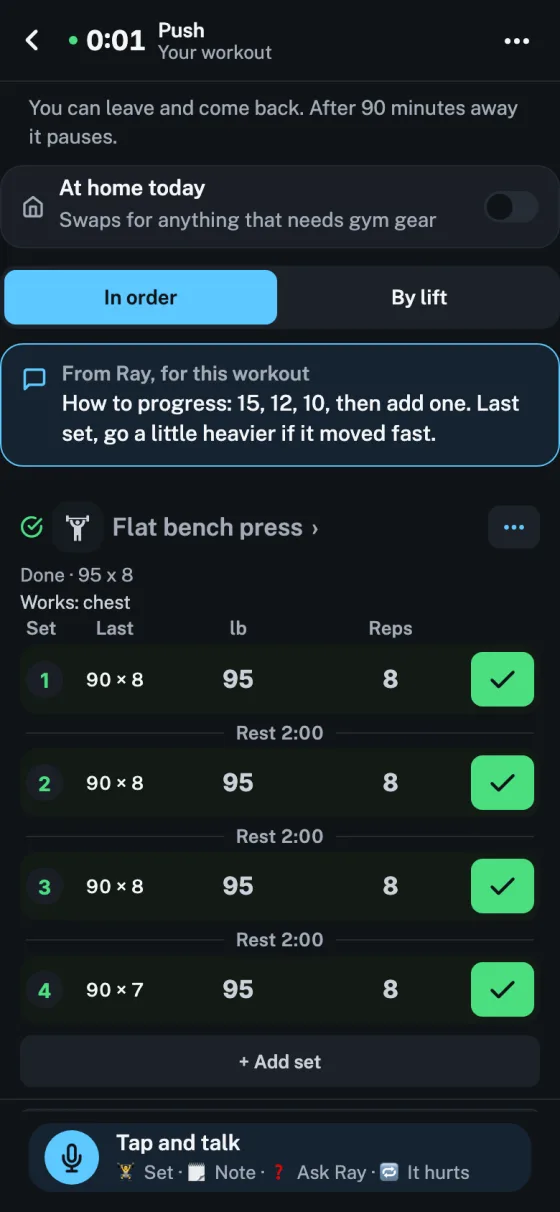
In a workout, each set shows what the client did on that set last time, so a drop from set 1 to set 4 shows in orange. Tap Last time for the full history. Circuits have it too since October 18.
Live on the webPhones, in testing
Clear on Today.
The × on a Today card is now a Clear button, with the same three choices, and "+1 more" now says what it means, like "1 more thing for Wes".
Live on the webPhones, in testing
A calmer client record.
The top of a client's record is smaller: their ring and one line, like "1 of 3 this week, on pace". Rows wrap instead of being cut off, and titles are one calm size across the app.
Live on the webPhones, in testing
A calmer Today.
Today shows the three clients who need you most, each with why and one button, then everyone else this week as one line with a Message button. Tap Clear to mark one handled, not today, or not needed. A red flag can't be waved away.
Live on the webPhones, in testing
Swap a lift without losing your place.
Swap now has a search box over the whole library, with pictures, and you can type in a lift that isn't there. Nothing changes until you tap Use this, and the new lift keeps its spot in the superset.
Live on the webPhones, in testing
Remove or add a lift mid-workout.
Remove this lift sits under More, with five seconds to undo. Add to this superset puts a new lift into the round you are in. Bodyweight lifts no longer ask for a weight unless you want one.
Live on the webPhones, in testing
Say why a set stopped.
One tap: grip gave out, form broke, too heavy, too easy, or felt pain. It saves with the set, shapes the next weight Coachtor suggests, and shows on the coach's record.
Live on the webPhones, in testing
Core and Accessory lifts.
Every lift in the library is now marked Core (the big movement of the day) or Accessory, so plans fill each slot with the right kind of lift. Crush press is in the library too.
Live on the webPhones, in testing
Numbers that agree.
A client's record, Progress and the week dots now use one count of workouts this week, so they say the same thing. Long card text wraps instead of being cut off.
Live on the webPhones, in testing
880 more moves, stretching first.
The library adds 880 moves, led by stretches, each with its own clip and a short how-to. Three lifts that showed the wrong clip now show none until the right one is found.
Live on the webPhones, in testing
A clearer workout screen.
An Up next tag marks the set to do now. The how-to shows every step plus a Watch out for box. The number pad has +2.5 lb, the weight box shows every digit, one-side lifts say "8 each leg", and supersets have their own tint, apart from done green.
Live on the webPhones, in testing
Coach fixes from a real session.
Doing an in-person consult now closes the client's in-person ask. The plan sits first on a client's record, and Light or Dark is easy to find. The consult has a Done bar over the keyboard and shows supersets, and lifts without a gear tag no longer get barbell plate math.
Live on the webPhones, in testing
The same words on every screen.
Inbox, Clients, a client's record, Consult and Today now speak one language: Needs you when it's your turn, With Ray when it's theirs, Sent Oct 15 when it's done, and Gone quiet in red for a client who has slipped. Every button is one of five: Review, Send, Reply, Nudge or Book. Today shows how many clients need you, counted once each.
Live on the webPhones, in testing
Bringing clients over from Trainerize, done right.
The importer reads every kind of real Trainerize file correctly: one-dumbbell and one-side lifts keep the weight the client actually used, names that flip word order land on one lift, and numbers that look wrong are flagged for you to check instead of guessed.
Live on the webPhones, in testing
Email links open the right place.
A link in a Coachtor email now always opens your own account: if you're not signed in, it asks you to sign in first and then takes you there. Looking around with the made-up example people works as before.
Live on the webPhones, in testing
Something's off? Tell your coach mid-workout.
On any lift, tap More, then Something's off: wrong exercise, count each side or both together, weight is per dumbbell, counted differently (seconds, steps, reps), or something else in your own words. It goes to your coach only, up to 20 notes a day. The coach taps Fix it to change the plan from now on, or Just this workout, with undo either way.
Live on the webPhones, in testing
Plans that mix the gym's gear.
Plan styles now build each superset at one spot in the gym, like the rack or the cable stack, and follow the client's kit, with dumbbells at most about half of a day's lifts. Each lift shows one plain chip for how it is loaded: 1 kettlebell or dumbbell, 2 dumbbells per hand, Barbell, Machine or Band. One-side moves say it in the count, like "12 each leg".
Live on the webPhones, in testing
A new desk plan builder, and pop-ups in the middle.
Building a plan at a desk is redone, with a body-part picture on each lift and its how-to clip playing on hover. Every pop-up, on phone and desk, now opens in the middle of the screen instead of sliding up from the bottom.
Live on the webPhones, in testing
Wrong lift? Say so in one tap.
If a past workout filed a lift under the wrong name, the client taps Wrong lift and their coach gets a card. The coach moves those sets, and the plan, to the right lift in one tap, with undo.
Live on the webPhones, in testing
Cardio in your own workout, and training off-plan.
A client's own workout now has Treadmill, Bike and Rower: log minutes, and miles if you like. Coaches can tap Train something else today for a one-off session; it goes in the history and never into the plan.
Live on the webPhones, in testing
Start a plan over in a new style.
A client who already has a plan can be redrafted from a plan style like CCA supersets. Nothing reaches the client until you tap Send, and Put the old plan back stays until then. The consult also asks once whether the client trains in person or remote, and remote clients get a filmed movement check and phone photos instead of a scan.
Live on the webPhones, in testing
Smaller fixes.
Clients opens on everyone, sorted by name, with who needs you still marked. On Android, lift videos play, the How to button clears the bottom of the screen, and your music keeps playing through Coachtor's sounds and clips. At a desk, scrolling up a long conversation loads one older page at a time.
Live on the webPhones, in testing
A new workout screen.
The list is the screen: every exercise is a short row, tap one to log it right there. A checkbox for each set, Coachtor's own number pad, and How hard as four words (Easy, Good, Hard, Max). Rest shows up top and under the set you just checked. Supersets sit in one numbered box with rest after the round. Tap Last time for the last four sessions and use those numbers again. A short chime marks each set, quiet when the phone is on silent, with an off switch. Finish sits at the end of the list and lists any sets you skipped.
Live on the webPhones, in testing
Plan styles and program length.
Pick how a plan is built: Core, Core, Accessory (CCA) supersets, upper and lower supersets (CAA), Push, Pull, Legs, a mixed week, or one lift at a time. Coachtor marks the best fit for the client, and your usual style lives in Settings. Set the length too: ongoing, 3 or 6 months, or a goal date. The plan splits into phases, coach and client both see "Week 5 of 12", and you get a heads-up two weeks before the end.
Live on the webPhones, in testing
A calmer Inbox, and alerts that get through.
The coach's Inbox is one list of people, sorted by who needs you, newest or name. Tap a person to message them and handle what's waiting, like a check-in reply, on one screen. Messages lined up for later wait under Lined up. For clients, a coach's message, a new plan or a consult request now arrives by email as well as a phone alert. An Email me too switch turns the emails off.
Live on the webPhones, in testing
Gym managers, for owners who are not on the floor.
On your Gym tab, tap Add a manager and pick one of your coaches, or someone new by email, like a front-desk lead. Before you confirm, you see what they can do and what stays with you. A manager runs the team day to day: invites clients and coaches, sees the gym's clients (when your "See clients' app" switch is on), moves a client to another coach, and removes a coach with no clients left. They get the weekly report too, with every money line taken out. Money, rates, payments, billing, your brand and adding or removing managers stay yours. Take the role back any time, or they can step down.
Live on the webPhones, in testing
Managers see your coaches' phone numbers.
A gym's manager sees a coach's number on the coach's page, the same way the owner does, shared with clients or not. Only for coaches at the gym they manage, and only while they are a manager. Clients still see a number only when the coach shares it.
Live on the webPhones, in testing
Bring in a consult from before Coachtor.
On a client's record, open Consults, then Bring in a past consult. Paste the text or upload an Otter export, a text file or a Word file (up to 5 MB). Pick the day it happened, tick that they agreed, and Coachtor writes it up as history. No plan is made and nothing goes to your client until you save it. Then they see it, marked "From before Coachtor". It counts as their first consult, so the next one is a follow-up. Your gym owner never sees it. Up to 20 a day per coach. PDFs are not read yet.
Live on the webPhones, in testing
Plans that run in order, with optional extras.
For each plan, pick In order or On set days. In order: the next workout up is whatever is next, "Day 3 · Lower body", and a missed day moves nothing. You set a weekly aim, like 3 a week. Add extras next to the days: a walk, a hike, 30 minutes on the treadmill (up to 8 a plan, 5 to 240 minutes each). They count toward the week and are never missed. On a short day your client taps Short on time and picks one of your extras, or a shorter version of their next workout with the main lifts only. Name the program too, like "Strength block 1". A consult follow-up can now send a plan with no set weekdays.
Live on the webPhones, in testing
A new client record, built around what is next.
A blue top shows this week: a ring, a plain status (Doing well, On pace, Watch or No plan yet) and a seven-day strip. Under it, one Do next with one button, red when a client needs you, and a win to cheer when nothing is waiting. Below are eight cards: Plan, Progress, Check-ins, Messages, Consults, Notes, Payments and Health. Each opens as a pop-up, and nothing starts open. Same data, same who-sees-what.
Live on the webPhones, in testing
Your phone number, only if you want it shared.
Add your number under Your account. It stays hidden from clients until you choose to share it, and you pick text only, or call and text. A client with a shared number sees a "Text" row on their Coach tab, with a nudge to message you in Coachtor first. Your gym owner always sees it, marked hidden from clients when you have not shared it. Other coaches and other gyms' owners do not.
Early test, one coachPhones, in testing
Food tracking, phase 1.
A client logs a meal with a photo or a few typed words. The AI guesses what is on the plate, the client checks it and fixes it before anything saves. It is off for everyone by default. Today one coach has it on for their own clients, and each client stays off until that coach picks how much to count for them. No red, no "over", no streaks.
The AI reads a meal only on the client's own yes to Coachtor's AI, plus a yes to food photos the first time they open food. Up to 12 estimates a day per person. A coach sees meals logged while the client was at their gym. A gym owner sees them only if "See clients' app" is on. Clients can delete all their food data in one tap, and it comes with their full copy. More gyms and coaches come later.
Live on the webPhones, in testing
A calmer start for a new coach.
A welcome screen with your gym, your photo and your name, and one button: Start coaching. Then Today shows a short setup card with a progress ring and the minutes left. The next step is a real button, and done steps fold into one green line. When you finish, one green card says you are set up, and Today goes back to the coaching day.
Live on the webPhones, in testing
Little things that read wrong, fixed.
"1 minute" and "1 lift", not "1 minutes" and "1 lifts". The owner's money tiles say "A month per member", not initials. After today's workout, the client's Today turns green: "Done today", with the next one as "Next time". A brand-new client reads "1 this week. The chart fills in from week 2." A kilo client's empty bar is 20 kg, not 20.5. Effort runs the same way everywhere, 1 Easy to 5 Brutal.
Live on the webPhones, in testing
Tidier screens, and faster ones.
Four client screens lined up after a careful look: the Coach tab title, the check-in dot, the Calendar's today line and the Me weight row. Today's counts now agree on the coach's Today, Inbox and tab. Progress loads faster. A phone address that no longer works is dropped instead of tried again and again.
Live on the webPhones, in testing
Kilos or pounds, per client.
A client picks kg or lb in Settings, and a coach can set it on their record. Plan building follows it, and a kg | lb switch on the record shows either view. Weigh-ins show in the unit they were taken in.
Live on the webPhones, in testing
Owners see their own gym's coaching only.
A gym owner sees nothing about a coach's clients outside that gym. Work a client did before they joined the gym stays hidden from the owner unless the coach shares it, with a switch on the client's About page, off to start.
Live on the webPhones, in testing
Get set up, step by step.
A coach gets a Get set up list on Today, and an owner gets a Gym checklist. A practice client can be added with one tap, so you can try Coachtor before a real client is on it. The old tours are gone.
Live on the webPhones, in testing
Progress on two pages, and a week at a glance.
Progress splits into Strength and Bodyweight. A This week strip shows where the week stands.
Live on the webPhones, in testing
Email alerts for coaches at a computer.
If no phone of yours gets notifications, you get an email when one of your own clients messages you or answers a check-in: "Ana sent you a message", or a count when several are waiting. At most one of each kind an hour. It never holds the message's words or the check-in's answers. It follows your switches and quiet hours, and every email has a link to stop them.
Live on the webPhones, in testing
Clients see how to pay you.
On My business, write how your clients pay, with a link if you have one. Your client sees it above I paid, and their Coach tab lists the payments you confirmed. Only you and your current clients see it. Stop coaching now says the payment is separate and how to stop it. Coachtor still never takes or moves money.
Live on the webPhones, in testing
Messages you can search and reply to.
Scroll up for older messages, search a conversation, and reply to any message so the answer shows what it answers. With no signal, what you typed waits on the phone and says Waiting to send. On the desk, Enter starts a new line.
Live on the webPhones, in testing
Plans say who can see them.
Every plan screen has one line: "Only you can see these changes" or "Alex can see this plan". Buttons say what they do: Send to Alex, Save privately. Changes made on the phone save privately to your account, so the desk picks them up. A lighter week in a new phase is a tick box, off until you tick it.
Live on the webPhones, in testing
A More tab, Gym settings, and your own account.
Coaches get a More tab for Library, Exercises, Forms and My business. Owners get five tabs (Gym, Today, Inbox, Clients, More) and a Gym settings page for setup. Settings are one list under Me, and save what they show. Edit your name, change your email with a code, or remove your photo.
Live on the webPhones, in testing
Consults: type at the desk, check before the write-up.
Type your consult notes in the browser. A consult ends with a list to check, then Looks right, write it up. Clients talking with the AI can pick "I'll tap when I'm finished". A recorded consult plays on any device you are signed in on. "Later" on a consult holds until tomorrow.
Live on the webPhones, in testing
A faster, tidier start.
Today and Coach load faster and say Loading instead of sitting blank. The sign-in code goes in as soon as you type the sixth digit. The first-run tour shows only to a coach with no clients, and each client gets one "Here's what I heard" card. Lift names fit the desk plan, and its minutes match everywhere else.
Live on the webPhones, in testing
Removed money comes back for 30 days.
Removing a payment, expense or package asks first, and Restore brings it back for 30 days. Invites say what really happened: Copied, not sent yet; Shared; or Joined. Never "sent" when it was only copied.
Live on the webPhones, in testing
The app says what is true.
A write-up says ready only once it has saved. A screen that could not load says Didn't load, instead of looking empty. A setting waiting to save says so, and saves when it can. An app update waits with Update ready and never restarts a screen you are using. If your gym uses a waiver, it is checked on every screen and by our server.
Live on the webPhones, in testing
Take a full copy of your record.
One tap saves everything as a single file: workouts, check-ins with their answers, both sides of your messages, forms, habits, consult write-ups, appointments and payments. Photos, videos and voice notes come as real files that never expire. Each part shows a tick, or says it could not be included so you can try again. Coaches and gym owners get a copy of their own work too. The PDF is labelled a summary.
Live on the webPhones, in testing
Check-ins and message files stay with your coach.
Your weekly check-ins and the photos, videos and voice notes in your messages are seen by your coach, and your team's coaches if you train on a team. Never the gym owner, even when the owner can look at clients' app. Every privacy line in the app now names who actually sees it.
Live on the webPhones, in testing
Changing coach is clear in Messages.
After a move, your old coach's messages stay under their own name, and a line marks the change: "Your coach changed from Sam to Jordan on Oct 3." The new coach sees the old messages as the other side, not their own.
Live on the webPhones, in testing
Moving a client asks first.
Owners: picking a coach now opens a check that names everyone involved and who gets a notification, then Move or Cancel. Nothing moves on one tap.
Live on the webPhones, in testing
Back to it, and no more letters.
With a workout running, Today says Back to it instead of Start. Workouts are called by their names everywhere, never A, B, C. On the desk, the plan header says when changes are waiting to send.
Live on the webPhones, in testing
Reviewing a consult, in three steps.
Ask first, then the plan, then send. Claude lists the few things the plan still needs to know; send them to your client as one numbered message after a confirm, or skip and plan anyway. The plan opens when they reply. What they told you sits in short tiles that open on a tap, and the top says how the consult was done: recorded, typed, or talked with the AI, with its real length.
Live on the webPhones, in testing
Your own offers, and a plan sized to one.
Under Account, list what you sell: a single session, one week, or 2 to 104 weeks, in person or online, and sessions a week. Up to 12. The write-up suggests the one that fits and says why, then drafts to its size: one workout, one week, or phases with phase 1 written and the rest outlined. Change the offer with a tap. With none saved, four starting offers show until you change one. Only you see your offers.
Live on the webPhones, in testing
Fewer stuck talks, fewer accidental asks.
If a client's talk with the AI has not got going in 20 seconds, the app offers Type it instead, and the screen stays on while they talk. "Ask for a follow-up consult" and "Ask for a first consult" now ask you to confirm before your client gets the buzz.
Live on the webPhones, in testing
Signing out leaves nothing behind.
Sign out always lands on the front door with every screen fresh: no client cards, no gym name, logo or color from the last person on the phone.
Live on the webPhones, in testing
A set is never deleted by accident.
Swiping a set only shows Remove. Tap it and the set goes, with Undo for 5 seconds; in a superset it asks first. Swapping or taking out a lift keeps the sets you already ticked.
Live on the webPhones, in testing
Nothing typed is lost.
A half-done check-in, typed consult or "Something else today" stays on the phone if the app closes and comes back where you left off. "Something else today" finishes with no signal and sends when it can. The workout bar no longer covers any button.
Live on the webPhones, in testing
Plans laid out as phases, that bend with real life.
Lay out the phases ahead of time, each with a name, a length and what it is for. When life happens, pause the plan, add two weeks, or move to the next phase now, and every later date moves with it. After a gap, ease them back in. Suggestions come to you from a follow-up consult, an "It hurts", tired check-ins in a row (2 by default, 1 to 4 per client) or a client's "Going away?" note, and each waits for your yes or no. Choose whether a client sees their phases or just their workouts.
Live on the webPhones, in testing
Replies show what they answer.
A message you send from a win, a workout recap, a check-in, a red flag, a goal nudge or a quiet-client chase now carries a small card above it saying what it is about, like the PR you are cheering. Both of you see it, and a tap opens it. Plain messages look the same as before.
Live on the webPhones, in testing
Every lift's history, one tap away.
Tap any lift on a client's record, a recap or a past workout to see that person's history with it: how many times, the last, the best, the trend, and every session. Workout days on the record open the whole workout, with Edit for the coach. Clients see their own on Progress.
Live on the webPhones, in testing
Numbers picked, not typed.
Height, weight, birthday, measurements, habits, goals and most coach number and date boxes now use wheels and plus or minus buttons. A weigh-in is never saved from a guess: it starts empty, with last time's number as a hint. Sets in the workout logger stay typed, as before.
Live on the webPhones, in testing
A clear ask about the AI.
A client who has not said yes or no to Coachtor's AI gets one short pop-up on opening the app, once: what they get, that their coach checks everything first, and how to turn it off under Me. Yes, see what it covers, or not now. Never shown during a workout, and never to coaches.
Android, in testing
The keyboard no longer covers what you type on Android.
Messages, sign-in, forms and the other screens you type on now move up out of the keyboard's way on Android phones, the way they already did on iPhone.
Live on the webPhones, in testing
Ask a client for their first consult.
A new client with no consult yet gets an Ask button on the Consult tab, their record and their card. They do it in the app, typed or talked, in about 10 minutes. The ask lands in your message thread with them as a card with a Start button, buzzes their phone, or emails them if they have no phone that buzzes, with one reminder after 2 days. Changed your mind? Take it back until they start.
Live on the webPhones, in testing
Unsent work stays with its own account.
A check-in, a private coach note or a calendar entry waiting to send now belongs to the account that wrote it. Sign out and someone else signs in on the same phone, and it never shows up or sends as theirs. Anything older that was waiting with no account on it is held back, and the app asks "are these yours?" before it sends.
Live on the webPhones, in testing
The AI only on a clear yes.
A body scan read by a coach now names the client, and goes to the AI only if that client said yes to Coachtor's AI. A recorded consult goes to the AI on the client's yes, or, before they have been asked, on your "Client agreed to be recorded" tick. A taken-back yes, or an answer the server cannot check, is a no, and nothing is sent.
Live on the webPhones, in testing
Delete account removes every file.
Deleting an account now clears every place that holds the person's files: profile and progress photos, photos and videos in messages, body scans, consult recordings, and a coach's own demo videos. Then it checks they are gone. If any file will not go, the account is not deleted and the app says so, so you can try again.
Live on the webPhones, in testing
Fix or delete a past workout.
Open any finished workout from Progress or the calendar and see every set as logged, the time, how it felt and the note. Typed 315 instead of 135, or left the app running? Change a set, add or take one out, fix the day and length, or delete the whole workout. Coaches can do the same for their clients, and the workout says who edited it and when, so nothing changes quietly. Bests and the body map follow what is saved.
Live on the webPhones, in testing
The body map.
Every lift shows what it works on a front and back body: main muscles solid, helpers light, your own lifts too. While logging, a small map sits beside each lift and "today so far" fills in as sets are checked. Clients see their week shaded on the body, never graded. Coaches see the same week with light spots marked, and pick what counts as light for each client (4 hard sets a week to start).
Live on the webPhones, in testing
Tap where it hurts.
Swapping lifts for an injury starts on the body: tap the knee, shoulder, hip or back. Four quick questions come first, and any yes (a pop, swelling, numbness, it gave out) shows a refer-out note to send instead of a swap.
Live on the webPhones, in testing
Your map, your words.
Clients choose the figure their map draws: neutral, broad or curvy, a body shape and nothing else. Separately, and only if they want to, clients and coaches can say how they identify and their pronouns, in their own words if they like. Only their coach or their clients see it, and AI write-ups use their pronouns, or they/them.
Live on the webPhones, next app version
A 3D body to look around.
Under the body map, "Look around in 3D" opens a real muscle model: on a lift's page, on a client's week in Progress, and on the coach's Body and health. Drag to turn, Front and Back, pinch to zoom, and tap a muscle to see its name and what it shows. Same shading as the flat map, and coaches see light spots in a warm amber. On the web now; phones get it with the next app version. The flat map still does the coaching. Model: Z-Anatomy, from BodyParts3D, CC BY-SA.
Live on the webPhones, in testing
Plans that fit their life.
Ask how long and how many days a week a client wants to train, and every draft fits it: A and B for twice a week, up to A through F, with optional workouts that never count as missed. Warm-ups and cool-downs, a different weight for each set, an as-many-as-you-can last set, top set and back-offs. Before you write the next plan, one card shows their lifts, bodyweight, effort and attendance, and the AI reads the same card. Hikes, games and walks count, and planned rest days are part of the plan.
Live on the webPhones, in testing
Workout phases.
Every plan has a length: 12 weeks by default, set per client, or until their goal date. Two weeks before it ends, the next phase is drafted from what actually happened and waits on your Today. It starts only after you approve it.
Live on the webPhones, next build
Talk to change a plan.
Say "swap squats for something easy on their knee" and see each change side by side with a reason, then approve. Clients can talk mid-workout to log a set, leave you a note, ask a question, or get an easier lift for today. Live words on the web now; on phones with the next app version.
Live on the webPhones, in testing
Win the Week, and coaching from the floor.
Clients win a week by being active 4 days, and rest days the plan calls for count. Seven follow-ups for prospects who are thinking it over, an intro workout that ends on your offers, a refer-out card when something sounds like more than soreness, and a 3-week ramp back after.
Live on the webPhones, in testing
Follow-up consults clients do themselves.
Ask a client for a follow-up and they see what they told you last time, tap Still true or change it, and answer a few new questions. About 5 minutes, typed or talked. You get what changed and plan suggestions to review.
Live on the webPhones, in testing
A clearer Clients list.
Grouped by what each client needs from you, red for act now and amber for waiting on you, with one button per row. Each client's page opens on who they are and the one thing to do now.
Live on the webPhones, in testing
Clients know when it's AI.
Before a client does their consult in the app, one screen says they'll be talking with Coachtor's AI assistant, that it becomes a transcript for you, and that Anthropic and Deepgram process it. They tap I understand once. The voice also says it's an AI in its first line.
Live on the webPhones, in testing
A recording reminder.
Before you record a consult, the app reminds you to tell the client you're recording, and you tick "Client agreed to be recorded". Washington and some other states need everyone's OK. The tick is kept with the consult.
Coming, not on sale yet
Minute packs are coming.
A pack will be 60 voice minutes for $15, never expire, and be used only after your monthly minutes run out. They are not on sale yet. Until then, past your monthly minutes, voice waits until the 1st and your clients type instead. The iPhone and Android apps show what you have left.
Live on the webPhones, in testing
Consults with people who haven't signed yet.
Pick Prospect when you start a consult. No invite and no app for them. The write-up ends on an offer from your gym's list instead of a plan, then one tap: Signed (the invite goes out and week 1 is drafted from the same consult), Thinking (a follow-up date and a drafted text you send from your phone), or Not now. Book a follow-up consult, or set "follow up in 6 weeks" for any client, and it shows on your Today when it's due. Owners see how many consults turned into clients per coach, never who.
Live on the webPhones, in testing
A welcome for new clients.
A new client's first visit asks for a photo, birthday, height and weight, and what they wear (Apple Watch, Garmin, Fitbit, Oura, Whoop, Samsung or a smart scale). Everything can be skipped and comes back later as one small card. Age, height and weight go into the consult write-up and the first plan. Only the client and their coaches see them.
Live on the webPhones, in testing
Birthdays on your Today.
On a client's birthday, your Today shows a card with a happy-birthday message already written from their wins. Edit it or tap Send. Nothing goes out until you do. You can also fill in a client's birthday, height and weight yourself, for clients who never open the app.
Live on the webPhones, in testing
Delete a consult.
At the bottom of any consult. You confirm first, then the recording, the text and the write-up are gone for good. A plan you already sent stays.
Live on the webPhones, in testing
See where every client stands.
Each client on your list now says where they are: consult ready to review, wants to meet in person, plan to send, or on a plan. The ones waiting on you come first. Open a consult and tap Ask to send the questions it still has, in your words.
Live on the webPhones, in testing
One side at a time, counted right.
One-arm and one-leg lifts say so, start on the weaker side, and match those reps on the stronger side. Volume counts both sides. Planks and holds show seconds, like 2 × 20 sec. A big clock up top, and a workout left open for 90 minutes pauses from when you left.
Live on the webPhones, in testing
Voice minutes you can see.
Each month: 120 minutes of clients talking their consult with the app (about 12 consults), and 20 hours of your recorded consults. A heads-up on Today at 90 minutes and at 15 hours. Need more? Minute packs are coming ($15 for 60 minutes) but are not on sale yet; until then, past your minutes, voice waits until the 1st and your clients type instead. A talked consult asks the must-know questions first and wraps up by about 20 minutes, without ever mentioning the clock; what it skipped comes to you as a short list to ask in person. Typing never counts.
Live on the webPhones, in testing
Check-ins this week, on one screen.
Fifty check-ins become one page: how many came in, who has not, and the few that changed. Only those need you, each with a one-line summary and a reply drafted in your voice. Everyone on track gets a short note you review first, with Skip on every row, then one tap sends them.
Live on the webPhones, in testing
Form checks and questions after a workout.
Mid-workout, a client films a set; it reaches you tagged with the lift, the set, the weight and the reps. At the end they can ask a question, leave a voice note or send a form video. You reply by voice or in words.
Live on the webPhones, in testing
Body scans from a photo or PDF.
Snap an Evolt, InBody or any scanner printout. Coachtor reads the numbers, the person checks them, and they go on the chart beside scale weigh-ins. Anything the scan did not show stays empty, never guessed. Great for clients with no wearable.
Live on the webPhones, in testing
Consults with just a name.
No email? The consult still gets written up. You ask for an email only when you send the invite. Follow-up consults start from the last one and suggest what to change in the plan.
Live on the webPhones, in testing
Change many plans at once.
Edit a program and update everyone on it, skipping clients you changed by hand. Deload week, travel week or push everyone back a week, with a preview and Undo. Hurt knee or shoulder: swap the lifts for a few weeks.
Live on the webPhones, in testing
Gym floor mode.
Start an in-person session from Today, log their sets with big buttons and Same as last, and say a quick voice note. Session packages count down by themselves, and a client running low shows up with a renewal note drafted.
Live on the webiPhone, in testing
Your own clients, alongside the gym's.
A coach who works at a gym can also coach clients of their own: their own practice, with its own name, logo and color, or simply "Coaching with" the coach. One list of clients covers both, with your own marked Mine only and a filter. The two stay separate underneath: a gym plan never goes to a private client, and the gym's money and library stay the gym's.
When a coach moves on, the gym owner moves each client to another coach, or lets them go with that coach, and the coach's access to the gym ends. A client can also choose to go with their coach, with a week's notice to the gym. The client's history goes with them either way.
Live on the webiPhone, in testing
Workout recaps that do the work.
On a workout recap, Hold loads and Make it shorter now change the plan for you, with a preview first and Put it back if you change your mind.
Live on the webiPhone, in testing
The workout, start to finish.
Four tabs for clients: Today, Progress, Coach and Me. Today shows one workout and Start. The overview comes first, then a logger in plain words: "do these back to back" instead of letters, last time filled in, How and Swap on every lift, and Pause and Finish at the top.
A new best shows the moment it is logged, with how far it went up. The finish screen gathers the bests, the weeks trained, how it felt, and a card to share.
For you: Needs attention opens Today, and wins to cheer wait under it. Swap requests come to you, and approving one changes the plan.
Live on the webiPhone, in testing
Bring your programs over.
Print a program to PDF from Trainerize, TrueCoach, Everfit or another app, or take photos of a printed one. Coachtor reads it into a draft for you to check before anything is saved.
Live on the webiPhone, in testing
Old workout logs come too.
Strong, Hevy, TrainHeroic, or any spreadsheet with a date, a lift, the weight and the reps. Their history lands in Coachtor, so last time and new bests start full.
Live on the web
Send a workout link.
For the client who will not install an app. Text them a workout from their record. They open it on their phone, tick each set and finish, with no app and no password, and it lands in their history.
iPhone, in testingAndroid next build
A year of weigh-ins on one tap.
When a client connects Apple Health, they can bring in their past weigh-ins, so their weight chart starts full instead of empty.
Live on the web
Coming from another app?
How your clients, programs and history come over from Trainerize, TrueCoach, Everfit, PT Distinction and My PT Hub, side by side.
See how switching works
Live on the web
A better desk at app.coachtor.com.
Coachtor on your computer, with a left menu, Needs attention beside the client it is about, wide plans and clients, and a printable client report. Today's pass fit the plan builder on smaller screens and put plain labels on every button. Sign in with the code we email you.
app.coachtor.com
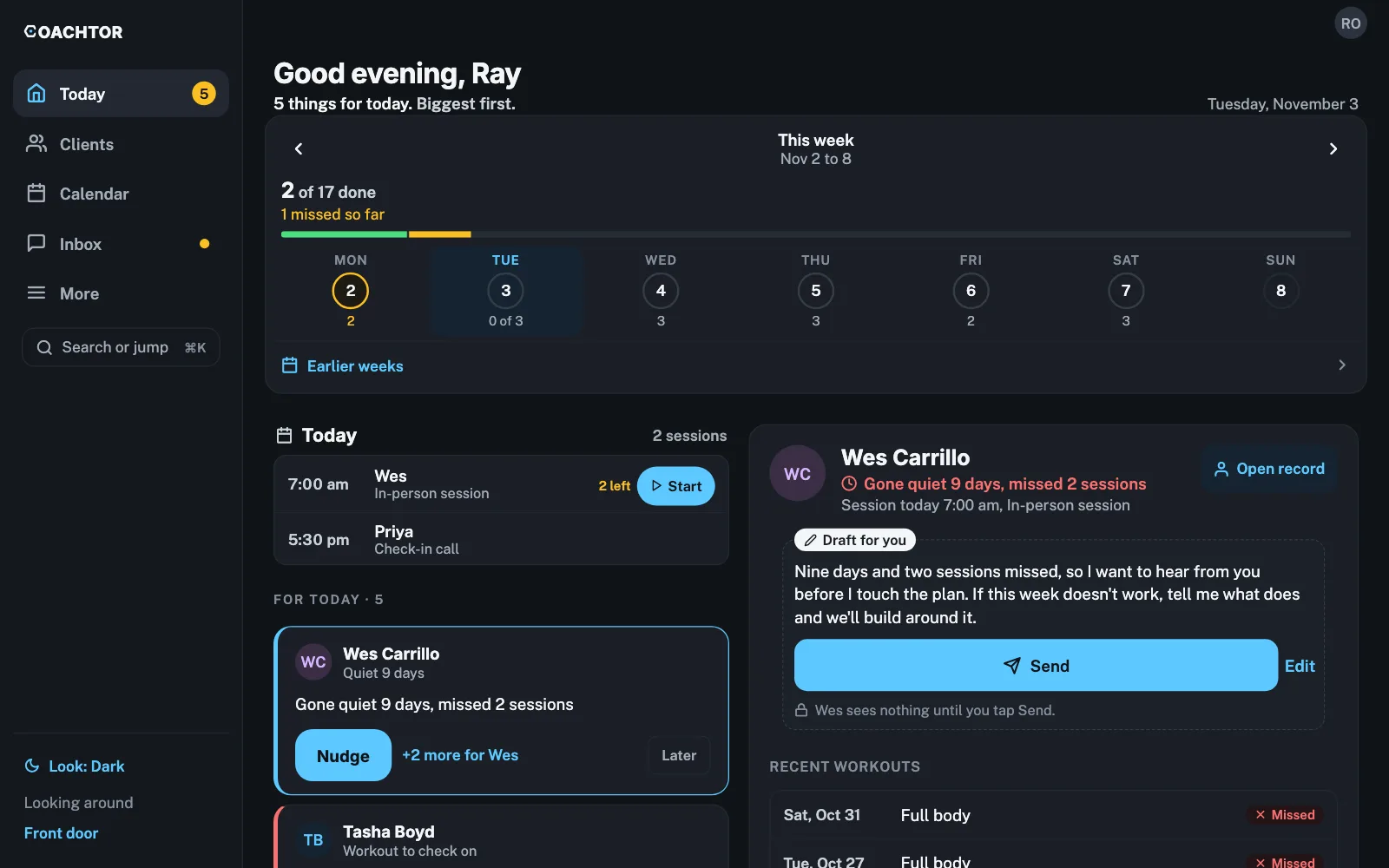
In testing
Apple Watch app, with live heart rate.
Clients see today's workout on their wrist, log a set with the Digital Crown, and get a tap when rest is up. Heart rate shows live on the Watch and the phone. It works with the phone left in a locker, and saves the workout to Apple Health.
Prefer a strap? A MyZone belt, Polar, Wahoo or Garmin strap shows live on the phone too.
Back squat · set 3 of 4
142 bpm
Rest 1:24
Zone 3 · 76% of max
In testing
Apple Health and Health Connect.
Weight and daily steps reach you on their own, so clients stop typing them. Finished workouts save back to their phone's health app. Health Connect, the Android version, brings in Garmin, Fitbit and Samsung too.
Live on the web
See as client.
Open any client's own app, read only, and see exactly what they see. Training them in person? Press Start and log the session from there.
Live on the webiPhone, in testing
Exercises: 1,000+ lifts with demo clips.
Browse every lift, watch the clip, read a short how-to, and add it straight to a client's workout. Each lift shows the client's history under it.
Live on the webiPhone, in testing
Your Library, in one place.
Programs, workouts, forms, habit sets, videos and saved messages. New items stay yours until you share them.
Live on the webiPhone, in testing
Copy a plan to many clients.
Pick a plan, a workout or a template, then send a copy to one client, a handful, or a whole group. Add to what they have, or replace it.
Live on the webiPhone, in testing
Coach at a gym and run your own practice.
One login for both. Switch between them, and your own clients stay yours, paid separately from the gym's.